
Your booking rules include:
- Check-in days: The days guests can check-in on
- Check-out days: The days guests can check-out on
- Minimum Stay: The minimum number of nights a guest can stay for
- Maximum Stay: The maximum number of nights a guest can stay for
- Block Accommodation: Any dates which are blocked from being booked
- Minimum advance reservation: The minimum notice you require to accept a booking
- Maximum advance reservation: The maximum notice you require to accept a booking
- Booking buffer: The days you need to keep free between bookings
To edit or create booking rules, use the ‘Manage Booking Rules‘ link in your dashboard under the ‘Room Bokings’ or similar heading:

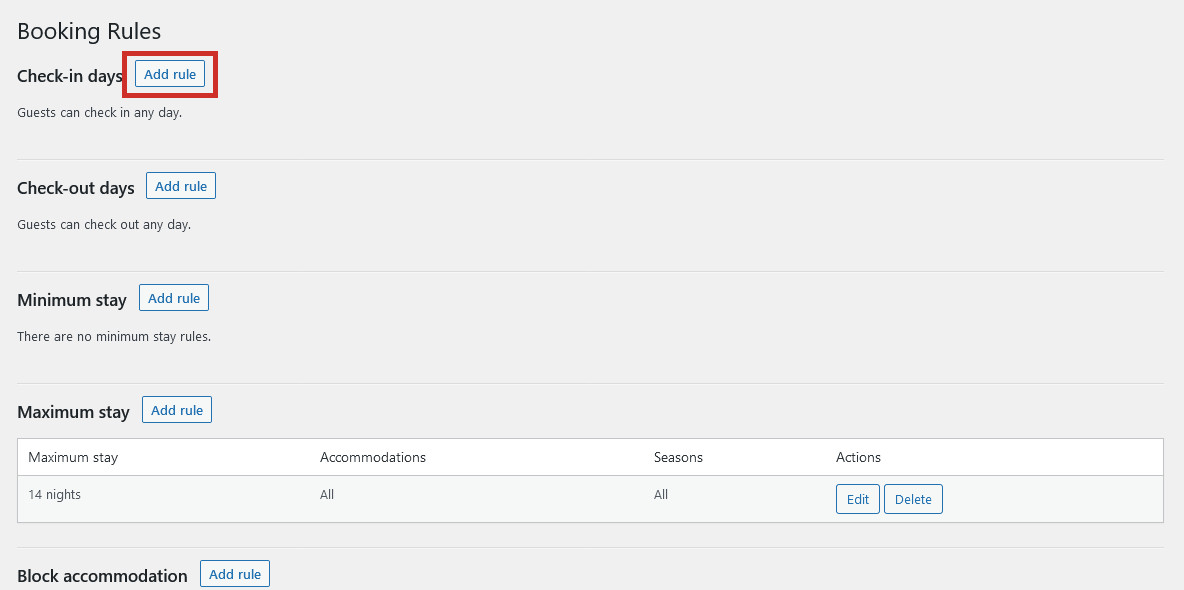
Here you will see any existing booking rules you have set up, which you can edit or remove, or create new rules using the Add Rule button next to the relevant heading;
Check-in Days
To limit check-in to only certain days, click ‘Add rule‘ next to the Check-in days heading. Here you can select which days allow checking-in, which accommodations this rule applies for, and during which seasons. Click ‘Done’ when you’re finished and Save Changes at the bottom of the page if you have finished editing your booking rules:
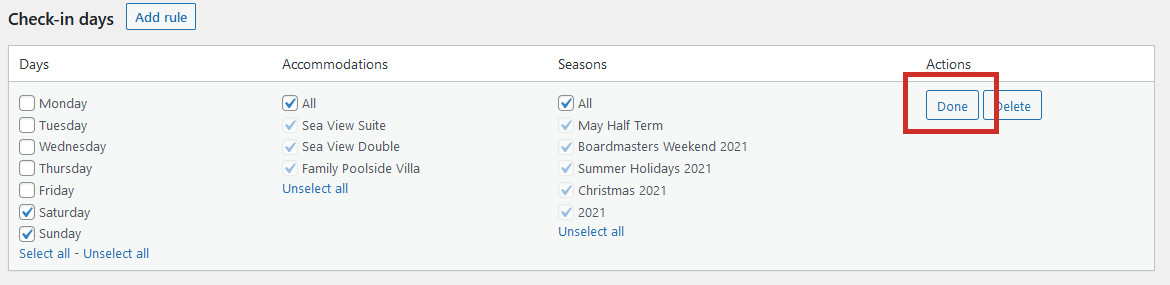
In this example, we’ve limited checking-in to the weekends only, for all accommodations and across the whole year. Guests will only be able to check-in on weekends.
Check-out Days
To limit check-out to only certain days, click ‘Add rule‘ next to the Check-out days heading. Here you can select which days allow checking-out, which accommodations this rule applies for, and during which seasons. Click ‘Done’ when you’re finished and Save Changes at the bottom of the page if you have finished editing your booking rules:
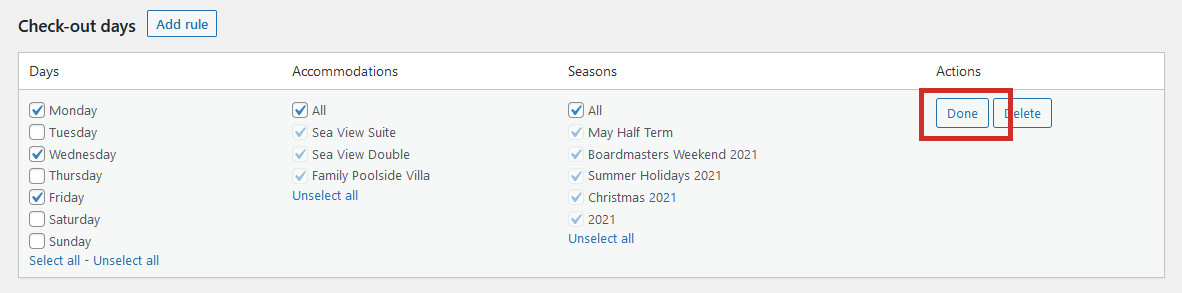
In this example, we’ve limited checking-out to Mondays, Wednesdays, and Fridays only, for all accommodations across the whole year. Guests will only be able to check out on Mondays, Wednesdays and Fridays.
Minimum Stay
A minimum stay rule will prevent any guests from booking a stay below the required number of nights. To create a minimum stay rule, click ‘Add rule‘ next to the Minimum stay heading. Here you can set the minimum nights which can be booked, and choose which accommodations and seasons this rule applies for:
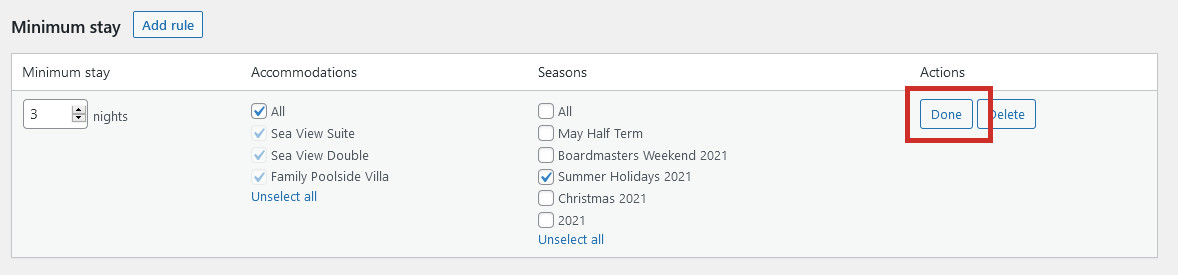
In this example, we’ve set a 3-night minimum stay for all accommodations, only during the Summer Holidays. Guests will not be able to book a stay which is shorter than 3 nights in length during this period.
Maximum Stay
A maximum stay rule will prevent any guests from booking a stay longer than the maximum limit. To create a maximum stay rule, click ‘Add rule‘ next to the Maximum stay heading. Here you can set the maximum nights which can be booked, and choose which accommodations and seasons this rule applies for:
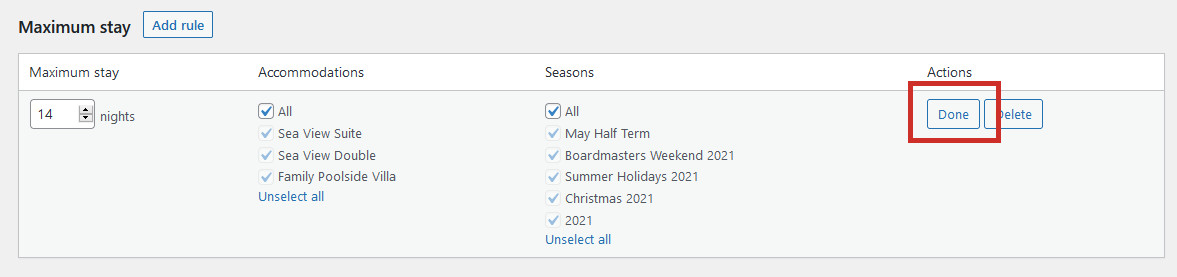
In the example above, we’ve created a 14-night maximum stay for all accommodations for the whole year. Guests will not be able to book a stay which is longer than 14 nights in length.
Minimum Advance Reservation
Setting a minimum advance reservation rule will determine how much notice you need before a booking can be made. In other words, in how many days before the chosen check-in date can a guest make a booking. A minimum advance reservation rule is useful if you require time to prepare the room ready for guests. To create a minimum advance reservation rule, click ‘Add Rule‘ next to the Minimum advance reservation heading. Here you can choose how many night’s notice you need, for which accommodations and for which seasons:
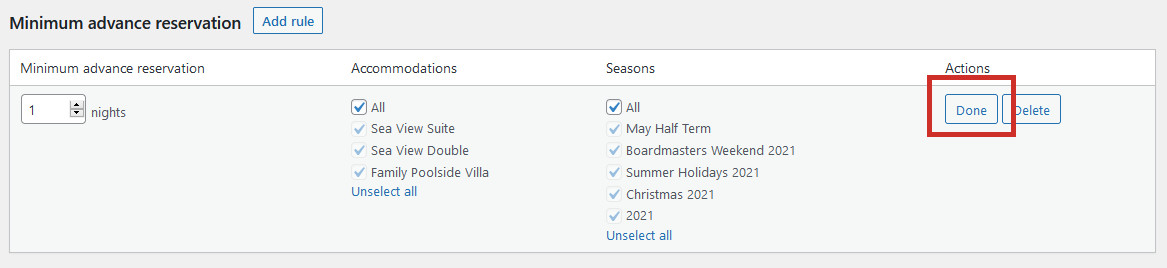
In the example above, we’ve set up a 1 night minimum notice rule for all accommodations and all seasons. Customers will have to book their stay at least 1 day before they are due to arrive.
Maximum Advance Reservation
Setting a maximum advance reservation rule will determine how far in advance a booking can be made. This is useful if there is uncertainty over future pricing and availability. To create a maximum advance reservation rule, click ‘Add Rule‘ next to the Maximum advance reservation heading. Here you can choose how far in advance a booking can be made, for which accommodations and for which seasons:
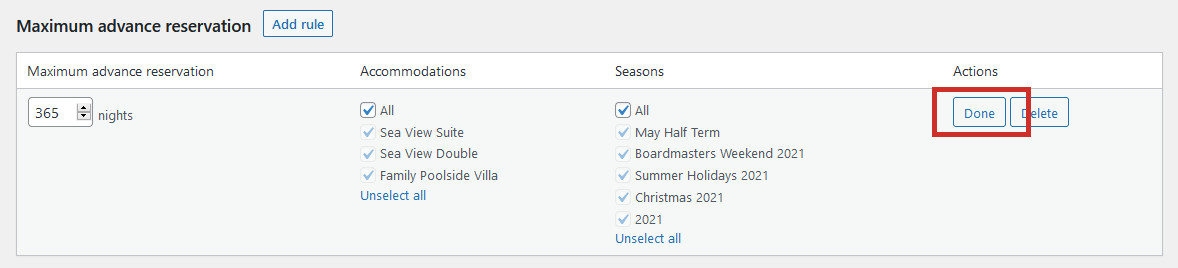
In the example above, we’ve set up a 365 night (1 year) maximum notice rule for all accommodations and all seasons. Guests will be able to book their stay up to 1 year in advance.
Booking Buffer
The booking buffer is extra time (in nights) added to the already booked dates – before and after the check-in and check-out dates. This might be helpful when you need to perform any extra deep cleaning procedures before a guest arrives and after they depart. To add a booking buffer, click the ‘Add rule‘ next to the Booking buffer heading. Here you can enter the length of your buffer and decide which accommodations and seasons this rule applies to:
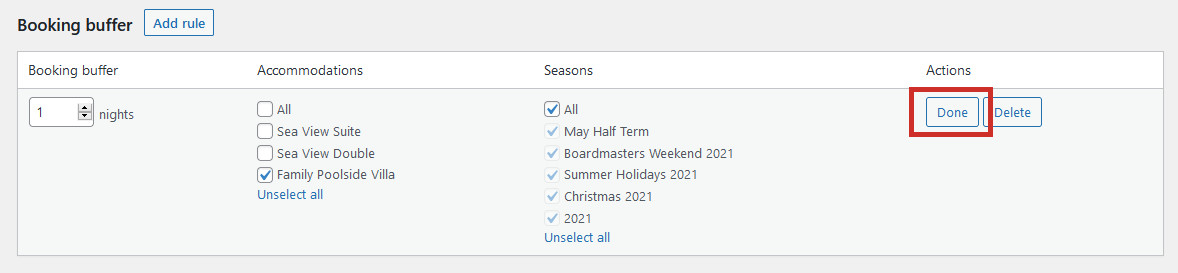
In this example above, we have set a 1 night booking buffer year-round just for the Family Poolside Villa, to allow for extra cleaning. This means there will always be 1 night free between bookings, and guests can’t check-in to the accommodation on the same day that other guests have checked out.
Don’t forget to click Save Changes at the bottom of the page when you are finished editing and creating your booking rules.